Free Babysitter Information Sheet Template (PDF + Word)
Last updated: May 2026 · Reviewed by Kidfile Team
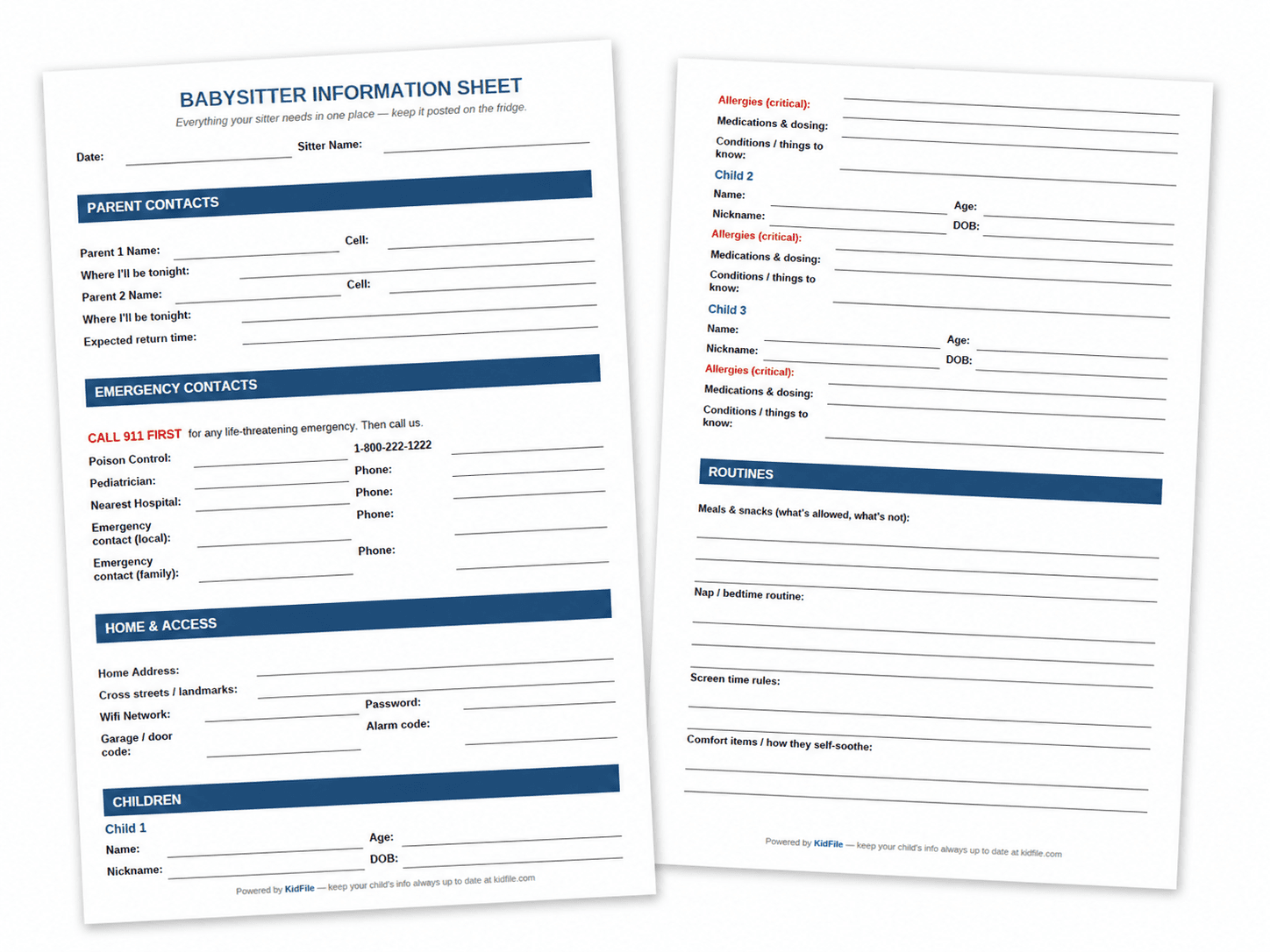
Short answer: A babysitter information sheet should list both parents' cell numbers, your home address, emergency contacts, each child's allergies and medications, the bedtime routine, and clear emergency instructions. Download the free Kidfile template below, fill it in once, and post it on your fridge.
Download the template
- 📄Download PDF— print and post on the fridge
- ✏️Download Editable Word doc— fill in on your computer
*Free. No email required. Both formats include all sections shown below.*
What the sheet looks like (filled in)
Here's an example of a completed sheet for a fictional family — Sarah and Mike Martinez, with two kids, leaving for a Friday-night dinner.
➡️ View the full filled-in example (PDF)
What to include in a babysitter information sheet
After talking to dozens of parents and pediatric nurses, these are the eight sections every sheet needs.
1. Parent contacts
Both parents' cell numbers, where each of you will be tonight, and your expected return time. List a primary parent — the one whose phone will definitely be on. If one of you is at a concert or movie and won't hear calls, say so on the sheet.
2. Emergency contacts
- 911 (always first for true emergencies)
- Poison Control: 1-800-222-1222 — this is the U.S. national number; it works from any state
- Pediatrician — name and after-hours number
- Nearest hospital ER — name and address
- Local emergency contact — a neighbor or nearby family member who can be there in 10 minutes
- Family backup — grandparent or close family
3. Home address and access
Your full street address is the single most important thing on the sheet. In a panic, a sitter won't remember the house number. Include cross streets, a visual landmark ("blue mailbox"), and any access codes the sitter might need — garage code, alarm code, wifi.
4. Each child's profile
Name, age, date of birth, nickname. Then the critical block: allergies, medications, and conditions. Print allergies in red. If a child has an EpiPen, inhaler, or any rescue medication, say exactly where it is stored.
5. Routines
Meal preferences, snack rules, bedtime, nap times, screen time limits, comfort items. This is where you prevent the 3 AM "she won't go to sleep" call.
6. House rules and notes
Visitors policy, off-limit areas, discipline approach. If you don't want screens on, say so. If timeouts aren't your thing, say so.
7. Emergency instructions
A numbered list at the bottom: "1. Make sure children are safe. 2. Call 911. 3. Call us. 4. Tell 911 our address. 5. Stay on the line." A panicking sitter can't compose; they can follow numbered steps.
8. Date and sitter name
So you know which version is current, and so the sitter knows the sheet was prepared for them, not for someone else last summer.
Babysitter info sheet vs. text message vs. info app
Most parents start with a quick text and graduate to a printed sheet after the first scary moment. Here's how the three options compare.
| Option | Setup time | Updates | Sitter access in emergency | Cost |
|---|---|---|---|---|
| Quick text message | 2 minutes | Re-type every time | Phone must be unlocked | Free |
| Printed sheet (this template) | 15 min once, 2 min per sitter | Edit Word doc, reprint | Posted on fridge, always visible | Free |
| Phone notes app | 5 minutes | Easy to edit | Sitter doesn't have your phone | Free |
| Child info app (Kidfile) | 10 min one-time | Auto-updates everywhere | Sitter gets shareable link | Free tier available |
The printed sheet wins for one-off date nights. An app like Kidfile wins when you have multiple regular caregivers (sitter, grandparents, school) who all need the same info — and you'd rather update it in one place than re-print five different sheets when the pediatrician's number changes.
A real parent moment (why this matters)
Real story, lightly anonymized.
"Our regular sitter was watching our two-year-old. He had a febrile seizure — first one we'd ever seen. She called 911 and then me. I was at a work dinner 20 minutes away and couldn't think straight. The paramedics asked her what medications he was on, and she just read it off the sheet on the fridge: 'Amoxicillin, 5 ml, last dose 6 pm.' That sheet probably saved us 15 minutes at the ER. He's fine. I'd been about to take the sheet down because I thought he was 'too old' to need it."
— Jess, mom of two
The lesson most parents told us: don't take the sheet down. Update it.
How to actually use the sheet
- Print two copies. One for the fridge, one for your bag. The fridge copy is for the sitter; the bag copy is for you in case you're the one who ends up at urgent care.
- Update it for each sitter. Most of the sheet is static — only the date, sitter name, and "where I'll be" change.
- Review it annually. Doses change, pediatricians change, kids outgrow allergies. Put a reminder on your calendar for the first of the school year.
- Don't gate-keep it. Grandparents, regular sitters, and even older siblings benefit from having the same info. If you find yourself maintaining four different versions, that's the signal to move to a digital child profile so you only update once.
What about a digital version?
A printed sheet is excellent for one night. It falls apart when:
- The sitter's coming back next week and you've already moved (the version on her phone is from last time)
- Grandma is picking up from school and asks for the pediatrician's number on her way
- Your co-parent doesn't have a copy
- You realize at 6:55 pm that the dose on the sheet is the old dose
Kidfile is a free way to keep your child's info — allergies, meds, contacts, emergency instructions — in one place that auto-updates everywhere you've shared it. Share a link with the sitter once; it stays current next time without you doing anything.
Create your child's Kidfile
One profile per child. Share a link with sitters, grandparents, or your co-parent. Update once, everywhere stays current.
Create your child's Kidfile →*Free. Takes 5 minutes.*
Frequently asked questions
What should a babysitter information sheet include?
Both parents' names and cell numbers, where you'll be, expected return time, home address, emergency contacts (poison control, pediatrician, nearest hospital, local backup), each child's allergies and medications, routines, and clear emergency instructions.
How do I make a babysitter information sheet?
The fastest path is to download a template — like the free Kidfile sheet above — fill it in once in Word, and print it. You can build your own in Google Docs, but a template ensures you don't miss critical sections like the poison control number or emergency steps.
What information should I leave for a one-time babysitter?
For a one-time sitter, prioritize safety basics: home address, both parents' numbers, allergies and meds, nearest hospital, a local emergency contact, and bedtime routine. Skip the deep house rules.
Should I include house codes and wifi password?
Yes for trusted short-term sitters — they need wifi, and codes in case the alarm trips. If you're nervous, set a temporary guest code, and take the sheet back when they leave.
Is a babysitter information sheet legally required?
No, but the American Academy of Pediatrics strongly recommends it. In an emergency, written info can save critical minutes.
What's the difference between this and an emergency info card?
This sheet is a full document you leave at home. Most families need both.
Related templates from Kidfile
- Allergy & Medication Tracker — log doses and reactions over time